01 October 2006

Windows XP on an iPod. Why not!


Sub Title: "
What happens on MojoPac, stays on MojoPac."

Last week I was handed a printout from a web article on MSNBC. I am not easly impressed but this product (MojoPac) has much potential. Throw away the fact that it is version 1. The fit and finish on this product release is very good.

Downloaded and installed the evaluation copy in minutes. Then proceded to load Lotus Smate Suite 9.8.1 (the whole thing), Open Office (the whole thing), and Adobe viewer. I did not use a stop watch, but i percieved that those applications ran quicker under Mojo on the thumb drive. Maybe? Learned how to "Pin" the Microsoft Termainal Server Client to the Start Menu. Works great.


Mobile computing just got more portable.

"Making even the latest pocketbook-sized ultra-mobile personal computers look more like lumbering giants, RingCube Technologies Inc. unveiled software that can virtually squeeze a PC onto an iPod, USB keychain drive, cell phone or any gizmo with digital storage space."

From the Mojo web site more information about Mojo "How does it work?"

Mojo Experience

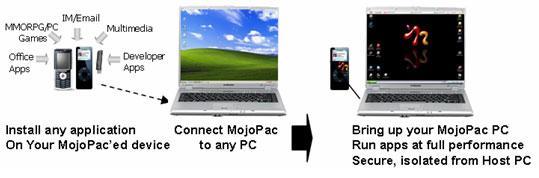
"Your experience using Mojopac is exactly as if you are using an ultra portable PC (your MojoPac device) and docking it to a computer (the Host PC you are plugged into). Your MojoPac PC is running from your portable device, but it is borrowing the resources (screen, processor, CD/DVD drives, internet connection, printers, etc.) of the Host PC. In other words, MojoPac is your real PC (your applications, settings, data), and any computer it is connected to is being used as a utility to run MojoPac.

Creating a MojoPac PC: Creating a brand new MojoPac PC takes less than 3 minutes. Plug your portable storage device (such as an iPod or a USB Flash or Hard Drive) into any Windows XP PC. Download MojoPac from our website and install it onto the device.

Once you have installed MojoPac, you can log into this MojoPac PC you created (which is running from your portable device), and bring up your newly created MojoPac desktop (MojoView). What you see is similar to a brand new Windows XP PC, and behaves exactly the same.

Using a MojoPac PC: You can plug your MojoPac enabled device to any Windows XP computer (Host PC), and you will immediately be presented with your personal applications, files and environment - and it looks exactly like a standard PC experience. In your MojoPac PC view (MojoView), installing applications is similar to installing applications on any PC - simply load the application installer CD/DVD, or download the application installer from the web and proceed as you would on any normal PC. In fact, in your MojoView, your "C" drive represents your MojoPac device, NOT the Host PC. So applications install in the right place automatically, no extra steps required.

MojoPac lives side-by-side with the Host PC: When you bring up your MojoPac PC after plugging your device into a Host PC, the Host PC will keep running as it was before the connection. You don't need to change the Host PC's settings, install anything on it, or close any of the applications that were running on it. Even more importantly, you can go back and forth between your MojoPac PC view and your Host PC view - you can work on both PCs at the same time, and operate both environments simultaneously. Using your MojoPac toolbar (MojoBar) you can easily toggle back and forth between the host PC view and your MojoPac view. Each presents you with whatever personal preferences and environments you have chosen for that system and MojoPac will never alter the settings or status of the host PC."


The Professional

"You've been lugging that laptop around for so long that one shoulder is now higher than the other. It's time for a smarter way to work.

MojoPac allows you to carry applications and files from your office to your home to a tradeshow in Tokyo on a device that can fit in your pocket. Imagine being able to access your personal versions of Quicken, Outlook, PowerPoint, and Yahoo Messenger by plugging in your iPod to any PC anywhere in the world. Your language settings are stored on your MojoPac - which means you can connect to a Japanese PC and still have all your environment and applications in English!

MojoPac also allows you to keep your home life and your work life separate, but enable to access both at the same time. Take your work with you. You never need to load work applications on your home system again, or worry about data synchronization. MojoPac can keep all your work applications and data completely separated from your home PC's disk drive. And once you remove the MojoPac-enabled device, your home PC will not retain a trace of your work information.

Take your home with you: You can use MojoPac to take your personal applications (multimedia, finance, games, instant message clients, and personal browsing) to work with you, connect to your work PC to run all these apps in the privacy of your MojoPac device, without leaving any trace on your work PC. Nothing will be installed or stored on your work PC, in compliance with your IT policies. What happens on MojoPac, stays on MojoPac.

Recommended devices for The Professional MojoPac: We recommend USB hard drives (1'', 1.8'' or 2.5'' drives) since they provide performance and portability while offering sufficient storage to carry business and personal applications for the Professional. For more in depth overview please visit our Devices for MojoPac page."
Some of the applications you can run on a MojoPac device:

Business and Productivity

Microsoft Office (Microsoft Office 2003 (PowerPoint, Word, Excel, Outlook): Enterprise, University, and volume licenses only **
Lotus Notes 6.5.3
Acrobat Reader 7
Mozilla Thunderbird 1.5
Quicken 2007
Open Office 2.0
Adobe Photoshop CS2: Enterprise, University and volume licenses only **

and Microsoft Remote Desktop- RDP Client

You can "pin" the RDP client to the start menu. I checked to make sure that when show local desktop drives is selected that the "Host" machine drives were not available. Indeed only Terminal Server displays the valid Mojo drives. Nothing on the PC hosting the client is visable.

Want more information then visit Mojopac.com. They have more detailed information about "What is Mojo", "How does it work?", "Who is it for?" and how to download and install a 30 day evaluation version.

October 10 update. Here is a link to iPod Linux. Why not?

Until the next post,


Steve

26 September 2006

Free PC, Citroen not included.


Insomnia strikes again. At the bottom of my virtual desktop is the headline, "Free PC with every broadband connection!. It is 01:00 and not a pop up, I click on the slashdot link.


"Neuf Cegetel announced the purchase of AOL France, an ISP that counts 500.000 broadband subscribers and the arrival of 'the box,' an Internet access terminal. Code-name: Easy Gate. It's a computer, working under the Linux OS. It's a router. It's a DSL modem. It's also a telephone. All in one. Easy Gate will be available from November, the actual 'box' consists of: an Intel 852 GM, 6 ports USB 2.0, 512 Mb of RAM and 512 Mb of Flash memory."


What happened to the Le Car? Le Pharmacy? It is called "the box"!!

This week the French telephone company, Neuf Cegetel, announced the purchase of AOL France, an ISP that counts 500.000 broadband subscribers & the arrival of "the box", an Internet access terminal. Code-name: Easy Gate. It's a computer, working under the OS, Linux. It's a router. It's a DSL modem. It's also a telephone. All in one. Easy Gate will be available from November, the actual "box" consists of: an Intel 852 GM, 6 ports USB 2.0, 512 Mb of RAM and 512 Mb of Flash memory, for a guarantee of 150 euros & 39,95 euros per month. An extra100 euros buys a flat screen, webcam, keyboard & mouse.

With this service, Neuf Cegetel, busy preparing its introduction onto the the stock exchange in October, hopes to conquer new customers who still hesitate over using the Internet, discouraged by the complexity of computers.
There are 10.5 millions broadband users in France, an average figure in European terms, on the other hand France is lagging behind in actual PC's, with just over 50% of households equipped.

A spokesman for Neuf Cegetel stated: "After installation, the user has a broadband connection & the principle functions of a computer via a simplified, user-friendly interface, reducing the complexity of using a computer as an Internet tool".

I have seen this before. About 20+ years ago France's national telco offered terminals (Minitel)

We knew it was coming, but is this it? Free hardware.

The Quio9 url is an English posting. I check the root site http://quoi9.net/ to see if it is also posted in French. No post.

I locate the web site for Neuf Cegental and find this page regarding 9Office. There is a picture of a box that looks like a thin client. Maybe. Did AOL sell off its positon in France?

I drill down and find the press release that AOL has sold its French holding to Neuf Cegetel. This time I will follow what will happen to a French telco.

September 26 update. Here is a new link to "the box."

Until the next post,

Steve
to its subscribers. It was their version of CompuServe done government style.

12 September 2006

NComputing: More than meets the eye.

Their Google ad periodically appears at the top of this blog. Of course after a review, I added them to my SBC vendor list. Thought to myself that this would be good for a home system. Mom and Dad really could manage what junior and sis could use on the PC and then I forgot about the product.

Was cruising the computer aisles at Best Buy and spotted one of their PC Expanion (L100) units on the shelf. How did this virtually unknown product get shelf space in one of the biggie chain stores (Home of the Geek Squad)? Decided to do some research.

From NComputing's web site:
"Founded in 2003 after 1 year hardware development with leveraging 15 years experience of multi-tasking, multi-user software application design, NComputing is a privately-held company established by Young Song, a former co-founder and executive of eMachines, Inc. (acquired by Gateway) and Klaus Maier, CEO of Hydrapark GmbH."
OK!! eMachine founder, friend of big retailers. That is the unknown link that may explain why the PC Expanion (L100) got onto the shelf. Then i came across this article before it was posted on their web site http://www.businessweek.com/magazine/content/06_27/b3991411.htm.

An except from Business Week's Peter Burrows, July 3 article titled "The Next Cheap Thing."
"It's the return of the "thin client," one of Silicon Valley's most hyped concepts of the 1990s. Luminaries such as Oracle Corp. (ORCL ) chief Lawrence J. Ellison and Sun Microsystems Inc.'s chairman Scott G. McNealy gushed back then over the idea that rather than own powerful PCs, Netizens could use these disk-less, processor-less "dumb" devices to access files and programs, stored on some remote server, via the Internet. It kind of made sense. After all, the disk drive and processor in your PC make up about 40% of the materials cost. And who uses all that processing power, anyway? For many of us, a PC is for sending e-mail and surfing the Web. Unless you're designing rocket ships or flying them in some graphics-rich video game, you barely test a PC's limits."
Thin client for the masses.

Studied the picture on the right. Ten users on single computer. The computer host can be either a Windows XP, 2000 Pro, Server 2003, or several Linux distros?

Back to my local Best Buy. "How much time do I have to return this product for a full refund if i am not happy?" I ask. "Thirty days", the clerk responds. To the check out lane I go with the L100 under arm.

Quick Installation Guide

There are three steps.
  1. Check you package contents
  2. Hardware Overview
  3. Quick Setup
The package contents include the L100 device weighing in at less than 2 ounces, power adapter, CAT5 cable, mounting bracket (if you want to), user guide and the Host Computer Installation CD. Got everything.

Hardware overview has pictures of the top and rear of the unit. The top has a power button, big power button. The back of the unit has a RJ 45 lan port, monitor port, Green PS/2 mouse port, Purple keyboard port, speaker jack, and power inlet jack. Nothing confusing back here.

The quick set up has 8 steps.
  1. Connect monitor, mouse, keyboard, lan cable, speakers, and power cable to the unit.
  2. Plug the lan (Ethernet) cable to either a switch/router or directly to the host.
  3. Connect power cord.
  4. Insert CD into the Host computer and follow the instructions.
  5. Reboot.
Did that. Also, if you connected to the Internet, the host installation will download the latest revision of their software if so you choose. A password must be keyed in for the managemnt consol and you have the abiltiy to not load the console on this host. At the end of the installation you are given an opportunity to add new users now or complete the installation with a reboot. It is easy to add users later on.

The host system setup is now complete.

The last three steps are;
  1. Turn on the unit by pressing the big power button. The button is silver and is surrounded by a big powder blue light. Looks like an activation switch for something in a Star Trek episode (any of them). No doubt about the device state.
  2. Click on the "Connect" Menu selection.
  3. Key in your log on name and password if required.
Done.

If you are using DHCP, this is all that has to be done. Using a static IP scheme , then you will have to setup the network connection manually on the L100 unit. The installation manual goes into great detail about how to setup a static IP.

If you have already setup your network using a static IP scheme, you do not need to read the manual. It is less difficult than any other device i have setup. Select setup from the menu screen on the L100 device and key in the IP address and the gateway address. Then select save. Now click on "Connect".

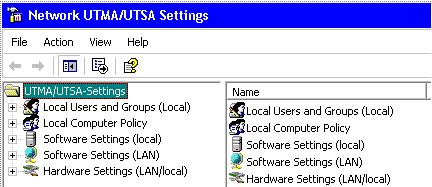
Total install time was under 20 minutes and I did NOT read the manual. But then I noticed this little icon in the tray. Right mouse clicked on the icon and selected "Managment Console".

This looked familiar. This looks like the MMC with several snap ins. Maybe I could hook up six, seven, or eight of these hosts on the same network (as many as 80+ users) and manage them from one system. Maybe I could connect some of the hosts with a wireless connection. Or how about using Ethernet over houshold electrical power to connect the L100 to the hosts? Did that. No problem.

Just like an informercial, there is more. How about using Server 2003 as host. How about a Linux host on the same network concurently. Why dual boot when you can have dual hosts? Did that.

How about adding terminal services back into SBS 2003? Their support site has that question under review and reports no problems so far. I went off in the other direction using Xandros Server for authentication and centrally stored profiles with a secured home directory. Log into any NComputing host on the network and get the same presentation. So far, no problems.

Until the next post,

Steve

17 August 2006

Personal Super Computer

From eWEEK.com, eNews & Views, August 17, 2006 Photo essay at Linux World Expo

TYAN Typhoon PSC (http://www.tyan.com/PRODUCTS/html/clusterservers.html)

The PSC stands for "Personal Super Computer." Supporting up to eight AMD Opteron HE CPUs and up to 64GB of DDR333/400 RAM, the Typhoon PSC is designed to tackle your research and other supercomputing needs. Those 30+ Gigaflops of desk-side processing power will set you back around $10,000 including CPUs and memory.


In perspective, Seymour Roger Cray sold the first 160 Cray-1 Super Computer in 1977, for 8.86 million USD. The speed was between 80 to 240 Megaflops. The first IBM PC when purchased with the upgrades like monitor, 512k of ram, and printer sold for about 5,000 USD.

What is a flops. Flops is Floating Point Operations Per Second. The "s" represents per second and does mean plural. Note the list below.

Prefix, Symbol, and Name

tera , T, Trillion 1 thousand x Billion
giga, G, Billion 1 thousand x Million
mega, M , Million 1 thousand x Thousand
kilo, k , Thousand just what it is

Now all is needed is some storage!


Pogo's StorageWare DA360 (http://www.pogolinux.com/storage/index.html) has 7.5TB of storage. Looks like it can be ordered as takeout.

Will get back to Google trends and SBC later. This was just to fun to pass up. How many sessions do you think this home super computer could host?

Until the next post,

Steve

15 August 2006

Goggle Trends and SBC

Google Trends is a product from Google Labs. Thought I would invest some time and try to extract some information that may be of interest regarding SBC. Google Trends permits the use of this information for personal and non commercial use. Google knows that my SBC blog is not commercial if they review my adsense account.

Google Trends has several predefined searches and I chose the skiing, surfing (see chart below) to learn about interpreting the chart.. The blue line is skiing and the red line is surfing..


Since snow skiing is predominantly a northern hemisphere activity it follows that interest in snow skiing is a function of the northern hemisphere seasons. The blue line peeks along the new year line. The red line surfing, compared to snow skiing, is just the opposite of surfers dreams, flat all year long. Surfing is global and enjoys a following from both hemispheres.

The lower trend line looks for news to see if there is a news article that may coincide with a spike in searches. The trend program picked a post from Metro Toronto for the "F" spike. More likely the Winter Olympics may be a contributer to the surge in skiing based searches.

There are three normalized views for the trend data. Cities, regions and language. Listed below are the top ten cities that searched on skiing and surfing.

The bar graphs for the relationships between cities and the two search criteria does not transfer well to a blog. You may want to open the trend chart using this link, http://www.google.com/trends?q=skiing,+surfing and view the actual chart yourself.

Top cities (normalized)

1. Brentford, United Kingdom
2. Dublin, Ireland
3. Bletchley, United Kingdom
4. Sheffield, United Kingdom
5. Minneapolis, MN, USA
6. Ottawa, Canada
7. Denver, CO, USA
8. Chicago, IL, USA
9. Calgary, Canada
10. Seattle, WA, USA

I was surprised viewing the results for the top ten cities. Dublin at number two for either skiing or surfing surprised me. The fact that surfing exceeded skiing was even more of a surprise. But upon further review there are those that think that Ireland is the best place for surfing in the northern hemisphere, if not world wide. Seattle at number 10 with surfing exceeding snow skiing by a wide margin was also surprising. Further investigation found THREE surf shops and one 32 old surf instructor. Maybe the coffee there is too strong.

Looking at the regions bar chart reveals another view. Ireland moves into the number one position with an equal amount of searches for skiing and surfing. Dublin must be the hot spot for surfing. I spent four days in Dublin and did not see a single surf shop. Also, never made it to the Guinness brewery even though i walked past the famous gate twice. New Zealand and Australia show up in the 4 and 6 spots with surfing exceeding skiing by a wide margin although both countries have skiing. Sweden, Switzerland, Netherlands, and Germany round out the normalized list.

1. Ireland
2. United Kingdom
3. Canada
4. New Zealand
5. United States
6. Australia
7. Sweden
8. Switzerland
9. Netherlands
10. Germany

The third chart is language. What language is used to make the query. For the skiing and surfing trends table, English was the most used language. Swedish, Dutch, German and French round out the chart. Although the search language is not that interesting for Skiing and surfing, the language used for searching SBC topics just may be.

Over the next few days I will add trend charts for searches on SBC topics like, client server, virtualization, streaming software applications and SOA to name a few. This is not a scientific research project. Google Trends makes the point that this is a work in progress and just enjoy. Let us see if we can spot a trend or two.

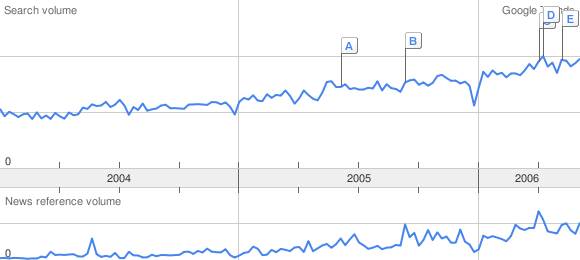
Service Oriented Architecture http://www.google.com/trends?q=soa

News Events

A) Jacada Supports BEA Service Infrastructure Product Strategy; Service Infrastructure Designed to Help Move Customers' Service-Oriented Architectures -SOA- Efforts from Pilot to Production Business Wire (press release) - Jun 9 2005
B) IBM Expands SOA Portfolio eWeek - Sep 13 2005
C) Bolivia: Bye, Bye, SOA Prensa Latina - Apr 4 2006
D) Opening SOA SYS-CON Media - Apr 10 2006
E) SOA Software buys Blue Titan Computer Partner - May 9 2006
F) "What's MIA in SOA?" Asks Metallect's CEO Guy Hoffman SYS-CON Media - Jun 6 2006


Top cities (normalized)
1. The Hague, Netherlands
2. Utrecht, Netherlands
3. Rotterdam, Netherlands
4. Amsterdam, Netherlands
5. Amersfoort, Netherlands
6. Bangalore, India
7. Chennai, India
8. Rome, Italy
9. Milan, Italy
10. Brussels, Belgium


Top regions (normalized)
1. Netherlands
2. India
3. South Korea
4. Italy
5. Belgium
6. Taiwan
7. Denmark
8. Israel
9. Brazil
10. Japan

Top languages (normalized)
1. Dutch
2. Korean
3. Italian
4. Danish
5. Japanese
6. Portuguese
7. English
8. Swedish
9. Chinese
10. French


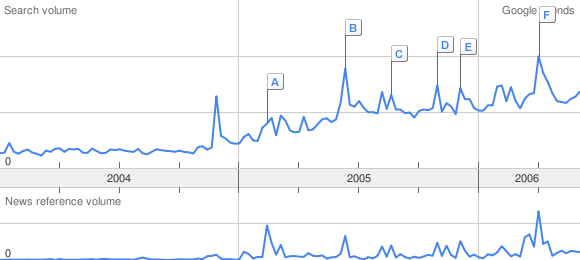
XEN http://www.google.com/trends?q=xen&ctab=2&geo=all&date=all


News Events

A) Novell Launches OES, Plans Xen Virtualization For SUSE 10 CRN - Feb 15 2005
B) Xen passes Windows milestone ZDNet.com.au - Aug 24 2005
C) Red Hat to include Xen virtualization in next Linux release OSDir - Nov 2 2005
D) Sun Microsystems adds Postgres database and Xen virtualization server to Solaris 10 TechWhack - Nov 18 2005
E) Xen launches new virtualization software VNUNet.com - Dec 6 2005
F) Virtual Iron Standardizes on Xen, Goes Open Source IT Jungle - Apr 3 2006


Top cities (normalized)
1. Munich, Germany
2. Stuttgart, Germany
3. Berlin, Germany
4. Frankfurt Am Main, Germany
5. Hamburg, Germany
6. Amsterdam, Netherlands
7. San Francisco, CA, USA
8. Chiyoda, Japan
9. Sydney, Australia
10. Tokyo, Japan


Top regions (normalized)
1. Russia
2. Norway
3. Czech Republic
4. New Zealand
5. Singapore
6. Germany
7. Hungary
8. Netherlands
9. Switzerland
10. Australia

Top languages (normalized)
1. Russian
2. German
3. Japanese
4. Dutch
5. English
6. Swedish
7. Italian
8. Finnish
9. Danish
10. French


VMware http://www.google.com/trends?q=vmware&ctab=0&geo=all&date=all


News Events

A) VMware Unveils New Desktop Virtualization Software NewsFactor Network - Apr 11 2005
B) VMware Shares Its Virtualization Code CIO Today - Aug 9 2005
C) VMware Introduces Free VMware Server CXO Today.com - Feb 6 2006
D) VMware 'Jolts' the Software Development Industry PR Newswire (press release) - Apr 3 2006
E) VMware Announces Virtual Desktop Infrastructure Alliance IT Backbones (press release) - Apr 24 2006
F) VMware Releases VMware Infrastructure 3 WebHosting.Info - Jun 5 2006

Top cities (normalized)
1. Taipei, Taiwan
2. Munich, Germany
3. Tokyo, Japan
4. Beijing, China
5. Chiyoda, Japan
6. Stuttgart, Germany
7. Guangzhou, China
8. Frankfurt Am Main, Germany
9. Hamburg, Germany
10. Berlin, Germany

Top regions (normalized)
1. Russia
2. South Korea
3. Taiwan
4. Hong Kong
5. Norway
6. Japan
7. Switzerland
8. Germany
9. China
10. Austria

Top languages (normalized)
1. Russian
2. Korean
3. Japanese
4. Chinese
5. German
6. Dutch
7. Italian
8. English
9. Swedish
10. Danish


News Events

A) Microsoft, Citrix Seal Terminal Server Deal TechNewsWorld - Dec 22 2004
B) New GFI Network Server Monitor 6 Checks Terminal Server and Linux Too Market Wire (press release) - Feb 24 2005
C) *vwd/BUSINESS WIRE: Ingenica führt die UniPrint Terminal Server Edition ein Vereinigte Wirtschaftsdienste - Aug 10 2005
D) Dymec's New Fiber-Optic Terminal Server Protects Utility SCADA Networks Yahoo! News (press release) - Oct 20 2005
E) Miraplacid Publisher 5.2 Terminal Server Edition PR Web (press release) - Oct 31 2005

Top cities (normalized)
1. Auckland, New Zealand
2. Amsterdam, Netherlands
3. Sydney, Australia
4. Brisbane, Australia
5. Dallas, TX, USA
6. Melbourne, Australia
7. Stockholm, Sweden
8. Madrid, Spain
9. Houston, TX, USA
10. Barcelona, Spain

Top regions (normalized)
1. Norway
2. South Africa
3. New Zealand
4. Russia
5. Netherlands
6. Spain
7. Australia
8. India
9. Sweden
10. Denmark

Top languages (normalized)
1. Norwegian
2. Russian
3. Dutch
4. Danish
5. Swedish
6. Italian
7. Spanish
8. English
9. Portuguese
10. German


On Demandhttp://www.google.com/trends?q=ondemand&ctab=2&geo=all&date=all


News Events

A) Siebel CRM OnDemand Adoption Accelerates Worldwide Business Wire (press release) - Oct 5 2004
b) Rabobank Deploys Siebel CRM OnDemand; The Netherlands' Largest Retail Bank Uses Hosted CRM Solution to Underpin Innovative Electronic Wallet Payment System Business Wire (press release) - Nov 17 2004
C) Agile Offers Customers the Agile OnDemand PLM Small Business Startup Pack, Free of Charge Yahoo! News (press release) - Jan 24 2005
D) Siebel Updates CRM OnDemand InternetNews.com - Jun 15 2005
E) Siebel Systems Further Enhances Enterprise-Class Capabilities in Newest Release of Siebel CRM OnDemand Business Wire (press release) - Sep 12 2005
F) Cornerstone OnDemand Selected As a Finalist in 2006 American Business Awards(SM) Market Wire (press release) - Jun 8 2006

Top cities (normalized)
1. Cambridge, MA, USA
2. Philadelphia, PA, USA
3. Boston, MA, USA
4. San Francisco, CA, USA
5. Seattle, WA, USA
6. Chicago, IL, USA
7. Austin, TX, USA
8. New York, NY, USA
9. Denver, CO, USA
10. Atlanta, GA, USA

Top regions (normalized)
1. United States
2. India
3. Canada
4. Thailand
5. Netherlands
6. Denmark
7. Switzerland
8. Sweden
9. Germany
10. Japan

Top languages (normalized)
1. English
2. Danish
3. Dutch
4. Japanese
5. Swedish
6. German
7. Italian
8. French
9. Spanish
10. Chinese

Until the next post,

Steve

04 August 2006

Broadband over Power lines is OK in US! FCC

Broadband over Power Lines (BPL) is not about SBC. It is just an interest of mine as is Broadband over wireless. I like more choices.

From the US Federal Commincation Commision.

"FOR IMMEDIATE RELEASE News Media Contact
August 3, 2006 Bruce Romano
(202) 418-2124
Bruce.Romano@fcc.gov

FCC ADOPTS MEMORANDUM OPINION AND ORDER ON BROADBAND OVER POWER LINES TO PROMOTE BROADBAND SERVICE TO ALL AMERICANS

Washington, DC - As part of its ongoing efforts to promote access to broadband services for all Americans and to encourage new facilities based broadband platforms, the Federal Communications Commission today generally affirmed its rules for Access Broadband over Power Line (Access BPL) systems while maintaining safeguards against harmful interference to existing radio services. If harmful interference does occur, the Commission will take appropriate action to remedy the situation. Today’s decision was adopted in response to a number of petitions for reconsideration of the BPL rules established in October of 2004.

In the Memorandum Opinion and Order (MO&O) adopted today, the Commission again acknowledged the significant benefits of Access BPL, reaffirmed its commitment to address interference issues, and reemphasized that the Part 15 rule changes were made to ensure that Access BPL operations do not become a source of interference to licensed radio services.

Specifically, the MO&O by the Commission:
Affirms its rules regarding emission limits for BPL, including its determination that the reduction of emissions to 20 dB below the normal Part 15 emissions limits will constitute adequate interference protection for mobile operations;

Denies the request by the amateur radio community to prohibit BPL operations pending further study and to exclude BPL from frequencies used for amateur radio operations;

Denies the request by the television industry to exclude BPL from frequencies above 50 MHz;

Affirms the July 7, 2006 deadline for requiring certification for any equipment manufactured, imported or installed on BPL systems, with the proviso that uncertified equipment already in inventory can be used for replacing defective units or to supplement equipment on existing systems for one year within areas already in operation;

Affirms the requirement that information regarding BPL deployment must be provided in a public database at least 30 days prior to the deployment of that equipment;

Adopts changes regarding protection of radio astronomy stations by requiring a new exclusion zone and amending consultation requirements for these stations; and
Adopts changes to provide for continuing protection for aeronautical stations that are relocated.

Denies the request by the aeronautical industry to exclude BPL operating on low-voltage lines from frequencies reserved for certain aeronautical operations;

Denies the request by the gas and petroleum industry to be considered as public safety entities;

Action by the Commission, August 3, 2006, by Memorandum Opinion and Order (FCC 06-113). Chairman Martin, Commissioners Copps, Adelstein, Tate and McDowell. Separate statements issued by Chairman Martin, Commissioners Copps, Tate, and McDowell.

ET Docket No. 04-37 and 03-104.

Office of Engineering and Technology Contact: Bruce Romano (202) 418-2124; Anh Wride (202) 418-0577.

-FCC-"

Until the next post,

Steve

03 August 2006

"What's in a name? That which we call a rose..

"What's in a name? That which we call a rose
By any other word would smell as sweet."

--From Romeo and Juliet (II, ii, 1-2)

Juliet is not happy with Romeo's name.

'Tis but thy name that is my enemy;--
Thou art thyself, though not a Montague.
What's Montague? It is nor hand, nor foot,
Nor arm, nor face, nor any other part
Belonging to a man. O, be some other name!
What's in a name? that which we call a rose
By any other name would smell as sweet;
So Romeo would, were he not Romeo call'd,
Retain that dear perfection which he owes
Without that title:--Romeo, doff thy name;
And for that name, which is no part of thee,
Take all myself.

Romeo spews forth the ultimate male response with call me anything you want but not late for dinner.

I take thee at thy word:
Call me but love, and I'll be new baptiz'd;
Henceforth I never will be Romeo.

Open up a word processor and replace Romeo with Server Based Computing. It is only a name. Virtualization is another name. So is Streaming, SAAS, and Service Oriented Architecture (SOA).

-----------------------------------------------------------------------------------------

Below is a press release from Wyse and VMware dated yesterday.


SAN JOSE, Calif.– 08/02/2006 - Wyse Technology, the global leader in thin computing, today announced a thin desktop device optimized for VMware Virtual Desktop Infrastructure (VDI), based on Wyse’s thin client OS technology. Wyse and VMware collaborated to make Wyse Thin OS – VDI Edition aware of key VDI-oriented technologies, enhancing the experience of IT and users deploying this innovative architecture.

VMware’s Virtual Desktop Infrastructure enables businesses and institutions to manage their desktops from the data center by placing a user’s desktop environment in a virtual machine, hosted on an industry standard server, and accessed by a thin client on the user desktop. VDI simplifies and centralizes the execution of applications in the data center, reducing the costs and complexity associated with using PCs to deliver applications.

Benefits include:

  • Consolidates and centralizes complete desktop environments within the data center
  • Virtualizes, optimizes, and manages server resources to host and deliver secure, isolated desktops that are always-on and accessible from anywhere
  • Improves security and compliance by centralizing sensitive enterprise data in the data center within isolated virtual machines
  • Built on VMware’s market-leading VMware Infrastructure and leverages the significant benefits of desktop virtualization
  • Reduces physical maintenance on the desktop Desktops can be remotely managed
----------------------------------------------------------------------

From the Ardence web site a portion of a press release dated over a week ago, WALTHAM, MA (July 19th, 2006)
“...Earlier this year, Ardence, whose on-demand software-streaming platform enables increased security, reliability and manageability at the desktop and in the data center, launched a special desktop edition of its platform for Dell. Called the Ardence Dell™ SmartClient, the special edition streams operating systems and applications on-demand from networked Dell servers to Dell desktops.

Takamitsu Higuchi, Uniadex Corporate Officer, said the Ardence Software-Streaming Platform is “A powerful tool that will help us expand our business. Importantly, the Ardence Dell™ SmartClient will help us increase our collaborative business with Dell and it will enable Dell to grow its market share for thin PC solutions throughout Japan.”

From an Ardence product summary,

"In summary, the Ardence Dell™ SmartClient:

  • Centralizes software deployment and management with a server-based operating system/application image
  • Simplifies software image updates (operating system & applications) because the entire software image is one file on the server
  • Can multicast an image to quickly boot multiple SmartClients simultaneously
  • Increases security and reduces adware, spyware and viruses
  • Saves IT time and costs through centralized deployment and image management
  • Achieves user speed and performance that matches a local hard disk
  • Leverages Dell OpenManage, Altiris and SMS tools
  • Supports Microsoft Windows XP Professional"
-------------------------------------------------------------------------------------------------------

Red Herring
is reporting today;
"IBM to Buy MRO Software: $740M

Acquisition will help Big Blue’s customers manage such assets as equipment and facilities. August 3, 2006

IBM agreed to acquire MRO Software on Thursday for $740 million to fold the asset management software developer’s applications into its management system, lifting MRO shares more than 17 percent."
From IBM's web site there is no press release but below is a description of MRO software from the IBM website.

"MRO Software is a leading provider of e-business solutions for strategic asset management. Hosted by IBM, MRO Software's MAXIMO 5 solution helps companies to manage and optimize the performance of all assets that have a direct and significant impact on their business operations. With MAXIMO 5, companies are often able to gain significant operational efficiencies in their maintenance processes, ensure parts availability, decrease investment in spare-parts inventories, and optimize the use of their labor resources.

Highlights

  • Offers lower integration and ongoing support costs
  • Provides greater scalability
  • Helps you gain operational efficiencies in your maintenance processes
  • Helps ensure parts availability and optimizes the use of your labor resources

MAXIMO's standards-based, component architecture is designed to help deliver lower integration and ongoing support costs, as well as greater scalability and deployable XML Web services for greater ease of collaboration.

MRO Software's participation in the
IBM Managed Hosting - application enablement program delivers the Maximo 5 application in both dedicated and shared infrastructure hosting models. This delivery model can deliver significant Total Cost of Ownership (TCO) savings to your business. Applications can be implemented rapidly and customized to suit your needs.

Additional details, MAXIMO 5 solutions are designed to help you:

  • Extend asset life and maximize ROI
  • Increase equipment up time and output quality
  • Optimize labor efficiency
  • Improve management of asset-related parts and material inventory
  • Increase vehicle availability, reliability and service life
  • Comply with safety regulations
  • Efficiently maintain trouble-free environments
  • Enhance customer service levels
  • Comply with government safety and environmental regulations

MRO Software offers productized integration adapters for major ERP, HR and project/financial business systems, as well as a component-based integration gateway for access to legacy systems. These pre-built adapters help enable end-to-end integration solutions."

August 10th update.

From eWeek.com
IBM to Acquire FileNet for $1.6B
By Renee Boucher Ferguson
August 10, 2006

"IBM made its 20th "Information On Demand"-based acquisition on Aug. 10, with the announcement that it plans to acquire FileNet for $1.6 billion, or $35 per share.

FileNet marks IBM's third acquisition in less than two weeks. The company also acquired asset management vendor MRO Software on Aug. 3 for $740 million, and the day before it purchased Webify Solutions for an undisclosed sum.

In addition to fitting into IBM's Information On Demand strategy, the FileNet and Webify acquisitions also fit into a category most software vendors are pursuing these days: SOA (service-oriented architecture).

Webify, which will become part of IBM's Software Group as part of the WebSphere brand, provides infrastructure software that helps with the creation, deployment and management of composite applications."

Is it not great to have choices? I suspect this is only the start. The stand alone desktop will remain king for years to come. But who is to be the queen, members of court, or the sheriff.

Unitl the next post,

Steve

01 August 2006

GraphOn GO-Global for Windows

Have been asked on numerous occasions, ”Is there a solution that does not require Microsoft Terminal Server and RDP.” Of course what the real question they are asking is there a solution that does not require a Terminal Server Client Access License. Yes there is. From the GraphOn web site and their product literature,


“The GO-Global family from GraphOn is a fast, simple, affordable application publishing and Web-enabling solution. Using advanced server-based computing technology and near-zero-footprint clients, GO-Global enables easy, cross-platform application access from anywhere in the world – regardless of connection, location or platform. So now you can use GO-Global for Windows to run Windows programs on your Linux and UNIX clients – and GO-Global for UNIX to run Linux and UNIX programs on your Windows clients. All without modifying a single line of code or adding infrastructure such as Citrix, Windows Terminal Services, or local X Server software.

Windows Application Access Made Easy.

Provides instant access to Windows applications from any device or platform, while retaining 100% of the application’s features, functions and branding

Eliminates the need for Windows Terminal Services, Citrix, costly rewrites, add-ons or extensions

Publishes one or more Windows applications, not the entire desktop

Integrates fully with existing platforms and infrastructure

Reduces costs, improves security, and simplifies licensing


Advanced Product Features.

Server-centric solution with near zero-footprint clients

High performance over low-bandwidth connections

Secure operation using native server security, Secure Socket Layer (SSL), and proxy server tunneling

Complete cross-platform compatibility

Integrated load balancing

Universal print driver, file access, and clipboard support

Session reconnect and shadowing


System Requirements.

Server
Windows 2000, 2003, or
XP
256 MB RAM, 500 MB disk space, TCP/IP connectivity, 56 Kbps or higher connection

Windows Client
Windows 95/98/Me/XP/2000/NT4.0/CE

Linux Client
Red Hat, SUSE, and others

Mac Client
Mac OS X

Java Client
Windows 95/98/Me/XP/2000/NT 4.0
Solaris
OS/2
Linux
Mac

Browser Plug-ins
Windows 95/98/Me/XP/2000/NT 4.0”


If you have the ability to view a flash demo, click the link to go to the GraphOn Go-Global products presentation http://www.graphon.com/flash/flash_demo.html for more background information.

GraphOn also permits private branding!!!

The Invisible Solution.

GO-Global is invisible to your users. Web enabled applications look and feel exactly the same as natively running applications. And as an ISV or an enterprise, you can private label the solution to promote your own branding. Software Development Kits (SDKs) are available for customized solutions.”

Some other features that maybe important to you,

“Drive Letter Mapping. Through the Cluster Manager, administrators can hide client and server drives and remap client drives.

SSL Security. GO-Global provides support for Secure Socket Layer (SSL) as a method for communication between Windows clients and GO-Global Servers.

Serial and Parallel Port Redirection for Linux. Allows applications running in GO-Global sessions to access devices connected to serial and parallel ports on Linux computers. Mouse Wheel Support for Linux. Allows users of the Linux Client to scroll using the mouse wheel.

Enabling Support for PAE

On Windows 2000 and Windows Server 2003, GO-Global supports memory in excess of 4 GB by way of the Physical Addressing Extension (PAE).”

For more information on accessing up to 64 GB go to http://www.microsoft.com/whdc/system/platform/server/PAE/pae_os.mspx.


The Cluster Manager is the control center for Go-Global for Windows.
“The Cluster Manager allows you to administer, monitor, and control client access to the GO-Global Server. The Cluster Manager displays a list of the users logged on to a GO-Global Server, along with the applications the users are running, and the time the application was started.

Through the Cluster Manager, you can perform a variety of administrative tasks, such as adding and removing applications, terminating user sessions, and ending processes taking place on the
server.”


Other important information from GraphOn,

“Load Balancing Requirements

A GO-Global Server must be installed on each of the servers in the cluster.

For Web deployment, each of the GO-Global Servers in the cluster must have a Web (server) running and the Web server home directory should contain the GO-Global Web files.”

How is easy is the installation? If you know which web server is installed on the server, then the only choices you need to make is Yes and Next. Then reboot. Copy the license to the server and click on the desktop shortcut “Go Global Cluster Manager”. Simple!

How about the client install? Only Yes and next is required. Then click on the desktop shortcut “Go Global client”. Simple.

Want Windows clients to have access to Unix/Linux applications? Go-Global Unix/Linux?


Until the next post,

Steve

23 July 2006

Mainframes to Microblades

On my dynamic Google desktop, I have a content box that tracks the path of the Hubble Telescope. As Hubble was approaching the southwest coast of Viet Nam heading in a north easterly direction, I noticed in the column to the left a headline from Slashdot, “The Future of Computing”. Not wanting to miss out on knowing what the future of computing is going to be, clicked to read the article. Interesting. And then I read the entire article by Dr. Fomitchev. Server Based Computing folks have been doing this for years. We call it homogeneous grouping of applications in silos.

From Slashdot,

An anonymous reader writes "Penn State computer science professor Max Fomitchev explains that computing has evolved in a spiral pattern from a centralized model to a distributed model that retains some aspects of centralized computing. Single-task PC operating systems (OSes) evolved into multitasking OSes to make the most of increasing CPU power, and the introduction of the graphical user interface at the same time reduced CPU performance and fueled demands for even more efficiencies. "The role of CPU performance is definitely waning, and if a radical new technology fails to materialize quickly we will be compelled to write more efficient code for power consumption costs and reasons," Fomitchev writes. Slow, bloated software entails higher costs in terms of both direct and indirect power consumption, and the author reasons that code optimization will likely involve the replacement of blade server racks with microblade server racks where every microblade executes a dedicated task and thus eats up less power. The collective number of microblades should also far outnumber initial "macro" blades. Fully isolating software components should enhance the system's robustness thanks to the potential of real-time component hot-swap or upgrade and the total removal of software installation, implementation, and patch conflicts. The likelihood of this happening is reliant on the factor of energy costs, which directly feeds into the factor of code optimization efficiency."


Until the next post,

Steve

Aggregation

They started out as text based terminals. Some labeled them as "Dumb". Then came choice of character color, traditional green, Swedish amber, and white if you did not want green or amber. And they connected to the Big Iron located down the hallway or some where in the building.Three hundred bps for remote access is very slow even in the context of its era. To be a Network Engineer then meant you made and trouble shot your own coax cable plant. Let's be honest, some "good old days" were not as good as others.

The terminals have morphed to thin clients and they no longer only connect to the "Big Iron" in the nearby data center. Although "thin client" means that they are dependent upon another system to be functional, they now have the capacity to be more flexible and independent. Can these devices replace a traditional Personal Computer?

My PC is no longer just my personal computer. It is a focal point for gathering information, enjoying entertainment, maintaining communication as well as the original purposes, word processor with spell checking, spreadsheet, and playing solitaire. My problem is I am stuck with the name and concept of "MY PC". MY, meaning MINE! And PC for personal and computer. My love for the PC grew from hate derived from the propeller heads that ran the data centers at the university. They had more rules than a small town judge magistrate that was paid a percentage of the fines. But with a PC, I was the judge, town council, and mayor.

Perhaps I no longer need a standard PC. Maybe not even a upscale ultra thin laptop. If the PC is no longer as important to me as before, then what is? My Data. Our Data. Managed access. And a medium to securely connect to the data. For many users that still means a PC, Laptop, hand held, Blackberry, and similar devices connected to their network. For me all I need is secure access to the resources that include information, intertainment, communications, word processing, spreadsheet and some additional small business services. Maybe some type of solitaire, but that would be optional. If access to the data is secure, do I care if the pipe is wireless, copper, fiber or aluminum? No. If access on the service side is secure, do I care if on the client side it is MY device or someone else's trusted device. No. But having had a PC since the summer of 77, I may have been scarred for life and may never truly get over them. But I am willing to try. How far can I go with out a PC?

Aggregation.

Wish I would of thought of using the word aggregation in a computational context first. Found the term in the Free On Line Dictionary of Computing. Although the definition refers to aggregation as a programming technique, I am going to adapt the term to identify how I could become PC free.

My basic requirement is that I have that ability to interact with services that will allow me to aggregate resources where I want them and store the benefits of those services where I choose to save them. That is what most of us do with our traditional PC, laptop or other portable device and them synchronize them when ever we are all together in the same room. But, I want the applications that are currently hosted on MY PC and synchronized attachments to execute elsewhere. word processing, Email, news, daily planner, IM, all of it hosted elsewhere. Do not send me notifications of patches, security fixes, or product updates. The service vendor does that by the hour, of every day, all year. If not, I will switch to a vendor that does maintain a good service. Do not lock me into some 24 month service agreement that has more rules than a small town judge magistrate. And I can select which services I use from a primary vendor then select other services from a collection of sources that meet my particular needs and wants. I then place the selected services on a virtual desktop the way I want to interact with them. A monthly fee of Free might make it a perfect solution. I could also choose to pay a premium for other demanded services.

Imagine a buffet restaurant that has everything you might want to eat but you can choose to order only those items that you want now. The sushi could be from Japan, pasta from Italy, kimchi from Korea, beef from Kansas and wine from Australia. Ala Carte is OK!. And if you have a fine Greek restaurant in your neighborhood, they just might serve everything you need and want. Ouzo anyone? Premium add on of course.

The point is I choose what is aggregated on the table. What prompted this diatribe? Many things but there are three events of note.

1) Google Calendar, Gmail, et al.
2) Damn Small Linux booted from a thumb drive.
3) Jetro CockpIT Universal Connector.

Recently, I have been asking people if they would like to look at MY calendar events on THEIR computer. It is amazing just how many different, and strange looks I got. If they respond with a yes, then I asked if they would like to be an event on MY Calendar. This went very well until I got to someone that had not updated their browser in several years. Do I want someone that has not updated their browser in years to be an event on MY Calendar? Yes and maybe this might help to motivate them to update. Now if Google could aggregate a word processor, Email...where is my list? Does Google have a version of solitaire?

Damn Small Linux is a distro that can be booted from a USB pen drive. The pen drive hosts a minimal OS and has a second partition which can occupy the balance of the pen drive capacity. DSL has a browser and rdesktop module included in the distro. The browser allows me to connect the web/grid and the rdesktop allows me to connected to other traditional MSTS hosted applications. One of my criteria for aggregation is the burning question of data storage, your place or mine? DSL on a pen drive provides a choice. The limitation is I must find a host that will allow me to boot from the USB port.

A couple of years ago or so, Jetro Platforms included a client named CUC, "CockpIT Universal Connector". It is still listed in the current release 3.6. This client connection would permit anyone with a rdp protocol enabled module to connect to a virtual desktop. Even though Jetro sits atop Windows 2003 terminal server, the rdesktop modules of the Linux distros I tested worked well. I invited Linux user groups to test drive the CUC and they did with success. The down side is that the Jetro administrator determines which services are aggregated on your virtual desktop. Maybe a organizational solution or one the grandparents might like?

In summary, since my telepathic skills are nil, will still need to attach to the web/grid with something. Need a minimal boot OS (PXE, network, Pen Drive, CD or hard drive) that has a browser and/or a supported protocol to reach MY services. But once connected with the services, how are I got there is transparent. Can a thin client boot into a browser and take me to the web/grid? How about using rdp to access an aggregated service provider? Or maybe "YouOS?'

Until the next post,

Steve

11 July 2006

Microsoft Terminal Services

----------------------------------------------------------------------------------------------------

It was an accident that I stumbled into Microsoft Terminal Server and later MetaFrame 1.0 atop TSE 4.0. Just about 8 years ago I was returning from Malaysia after setting up SMS for a company with sites in Europe, Latin America, North America and Asia. Malaysia was the last to join the SMS inventory list. The flight from Kuala Lumper to Los Angeles is almost 20 hours. Even the Boeing 747-400 had to stop for more fuel in Taiwan to get across the Pacific. It made the final leg, a “red eye” flight from LA the the east coast, seem like a puddle jumping commute. The project was completed almost three months early and I thought that the rest of my contract was about to be canceled. Not so.

Upon my arrival back the next day, I was summoned to IT Mount Olympus. Was informed that some guys from MS were bringing “Hydra” over in the afternoon. Advised since I had three more months on my contract I should talk with them and then set up a test bench replicating the company's global network for testing “Hydra” in the lab similar to what I did with SMS. The objective was to go wireless and replace the miles of CAT 5 cable that ran though the plants using TSE. An on staff person and I were to enumerate “Hydras” capabilities and flush out the flaws that would negatively impact the objective.

We split the evaluation into to two components. Wireless and PC (Desktop) replacement. The desktop replacement component hosted an audition for thin client manufactures and selected one to provide a 75 user test environment. The wireless component had the more difficult of task forecasting which wireless technology would win the standards war. He did, and the project made it onto the do list. Early the next year we had 15 brand new Certified Citrix Administrators spread out over 4 continents.

Citrix and/or Microsoft TS dominate the Server Based Computing market. For most IT administrators their choice is to add Citrix atop MS TS or go with TS alone. But even Microsoft acknowledges that at some point in the build out process you may need an additional product to leverage MS TS resources.

RDP has come a long way over the years. The differences between ICA and RDP for most users is not measurable. The differences are often at the implementation level and can be narrowed down to a few requirements. They are application-level load balancing, seamless presentation of applications, listing published applications based on user authentication and web based operations. If none of these features are on your have to have list, then MS TS may be all you need. Many of the vendors listed in the column to left think that upon your investigation of SBC, critical evaluation, and subsequent reflection, you just may need their assistance.

Microsoft Terminal Services can present to a user a remote desktop based on a profile and membership in a GPO. The user profile may be defined specifically for the TS experience or bypassed in favor of one profile. It is not complicated. The complications begin to arise when one starts to try make TS do on its own what the vendors listed in the left column have already done. The reason they exist is because there are complications achieving what they have done using TS alone.

I was teaching a Citrix MetaFrame class near Washington, DC comprised almost exclusively with employees of U.S. government agencies. The group at large looked as if they wanted to be somewhere else. To wake them up I said, “ninety nine percent of the Fortune 100 companies use this technology, and it is not because it costs a lot of money and does nothing”! It worked. Heads popped up and eyes opened. I remember it as one of my better classes.

But if all you need is a remote desktop for a subset of your IT users, MS TS may be all your need. You can download Microsoft Server 2003 R2 for evaluation. They have some on line forms to fill out to download the evaluation copy. I did for 32 bit and 64 bit versions. No problems. The URL is “http://www.microsoft.com/windowsserver2003/evaluation/trial/default.mspx”. This is a good place to start. Write down what your objectives are for implementing a remote desktop environment. Could be the old favorite, lower TCO. Could be a new favorite, lower my energy costs. A 5 watt thin client consumes less energy and generates less heat than a 200 watt PC. Then cross off all the objectives that can be achieved using MS TS. Nothing left on your list? You now have the beginnings of a solution.

Got something left over on the list? Look to the left column under SBC Vendors.

Until the next post,

Steve

05 July 2006

Edubuntu Live CD

Edubuntu is the education/terminal server member of the Ubuntu family of Linux operating systems. It is designed for the education market and includes a server based computing component. The TS portion is aimed at the classroom environment running within the school LAN. More on the TS portion later.

Edubuntu is available in three flavors. On their web site they list;

"PC (Intel x86) desktop CD
For almost all PCs. This includes most machines with Intel/AMD/etc type processors and almost all computers that run Microsoft Windows. Choose this if you are at all unsure.

Mac (PowerPC) desktop CD
For Apple Macintosh G3, G4, and G5 computers, including iBooks and PowerBooks.

64-bit PC (AMD64) desktop CD
For computers based on the AMD64 or EM64T architecture (e.g.,Athlon64, Opteron, EM64T Xeon). It is not necessary for all (most) processors made by AMD -- only their 64 bit chips."

These are "Live" CD ISO images that let your load the Edubuntu OS without installing the OS on to your system. Experience what the user will see and hear without committing to an installation. I loaded the x86 and 64-bit "Live" versions on the appropriate platforms without a problem.

Edubuntu does not claim to be the ultimate Terminal Server solution. It offers a clean and simple desktop from a server to a computer that meets the minimum requirements listed below and as posted on Edubuntu's web site.

"The minimum requirements for a thin client computer is a Pentium II with 48MB RAM and a 2MB display card. Recommended specifications is at least a Pentium II/300 with 64MB RAM and a 4MB display card. You will also need a method to boot over the network. Most newer mother boards (and network cards) have built-in PXE software that allows you to boot from the network. If it doesn't, you can create a network boot floppy or CD from http://rom-o-matic.net. Keep in mind that you need to enable PXE emulation when creating the boot media."

I tested the boot process using rom-o-matic, native PXE boots on several computers from multiple vendors, and a thin client device, without a problem. This is not however, a low bandwidth solution. This solution needs to run on a local area network. One hundred megabit switches or greater may be required for all but the smallest installations.

Once the "Live" CD is loaded, it places an icon on the desktop that will load the OS on to you local drive. That is good. The bad news it does not load the Terminal server portion of the OS. To see and follow the actual setup instructions as presented in the "Getting Started" document you will have the use the Alternate installation CD that is available on the same down load site. Just look a little lower on the download page. Download and burn the ISO image as listed in the "Getting Started" document, then boot from that alternate image.

The default installation assumes that you are setting up a new installation. And that you are using a 192.168.0 address scheme with this machine as a DHCP server for this network segment. For my testing I used another addressing scheme and the "Getting Started" document explains how to change the address range and restart the DHCP server. There is additional documentation if you want to add sound, have mixed computing architectures, and/or use another DHCP server.

What about printing? For me it is very nice. Had the choice of using SAMBA or CUPS. Choose both and they both worked just fine. I may be one of the few sites in the world that has an HP printer that works with all the Linux systems but none of the Microsoft OSes on site. What printer am I using for the tests?

Is Edubuntu ready for large installations, probably not. Being limited to a single server, there is no scalability. The one server goes down and you have a problem. I stored personal data on a Network Storage Device that was accessible by multiple operating systems and could go from one OS to another and keep my personal data. But this is contrary to the idea of a simple solution for education (or any other market segment). Overall however, it is a very promising solution. A few more steps on the development path and it will be a very viable option in the Server Based Comptuing market.

This blog is about Server Based Computing and not about the applications that are executed on the SBC platforms. However, since it Edubuntu is directed at the education market I will make a comment. Wish I had this option when I was in school. Even as a stand alone OS, it is worth looking at as a desktop OS.

Families that have trouble maintaining 2, 3, or 4 personal computers at home, might find this a welcomed solution. Has instant messaging, web access, and open office suite for creating documents and presentations. The repository of available applications is extensive. However, try downloading a program that requires an installation and your are not the administrator! Not today.

As a foot note to large organizations contemplating Server Based Computing for browser based applications or SOA, you might want to book mark another of Ubuntu's family members, Xubuntu.org. Theoretical capacity with existing technology is over 400 users per server. If it can achieve 25% of that it would be very interesting. The Terminal Server portion is not there yet, but it is included in the install as an option.

Was curious as to how to pronounce Xubuntu. Found three choices.

"ZOO-bun-tu", "ZOO-boon-too", and "ZOO-boon-tuu". They all agreed on "ZOO".

Until the next post,

Steve


13 June 2006

Konect Virtual Image NFR LIVE Evaluation DVD

Konect is a serverware solution from “Desktopsites, Inc” and the company web site is www.desktopsites.com.

Konect is targeting the SMB market that have 5 to 500+ Server Based Computing users. Konect seamlessly publishes applications ,web services and other resources with secure internal and external access.

Quoting from "get Konected";

“Konect makes sense when your business...

  • has staff that work from home, on the road or are in multiple locations
  • is in need of ways to give employees real-time access to applications &
    information
  • is looking for service service to customers
  • would like reduce IT licensing, management and support costs”

To keep the solution simple, icons for published resources are placed on the Windows desktop and in the Konect Launcher in the system tray. To the user community these resources can be utilized using the same skills as if they were local resources.

The solution has *Konect Management Console* that permits the server based computing solution administrator to manage the environment directly for only those users that require the Konect solution. Industry documentation calls this leveraging the RDP protocol. In other words, building upon the Microsoft remote desktop protocol to provide additional functionality.

Konect is deployed on Windows 2000 or 2003 Servers that utilize Active Directory. Konect has a Secure Gateway that uses ticketing to provide secure external connections. The company documentation is straight forward and advises you upfront that this solution will NOT work on the Small Business version of Microsoft server. The getting started documentation for the standard evaluation product is one of the best prepared (if not the best) presentation for new administrators wanting to review Sever Based Computing options that I have read.

The Konect Virtual Image NFR Demo DVD guide has about 30 lines of instructions for installing the VMware Player, image, and the remote client. It took me about 30 minutes to set up successfully (first attempt) the “Live” DVD demo. If you are familiar with VM Player then subtract 5 to 10 minutes. It took me a little additional time to understand the server inside a server concept and how to change the focus between the two servers. The virtual Network Interface also added a few minutes of thought time but was quickly resolved.

The test server I used was a Sempron based system with 1 GB of ram. The Demo DVD setup documentation suggests 1 GB but recommends 2 GB on on P3 at 800 MHz or higher. The client side should be 500 MHz with 128MB of Ram. The Microsoft NT/2000/XP clients require Java Run Time Environment 1.5.0 or higher.

Once the VMware Player is up and running, go to the client machine, open the browser and key in the IP address of the VM server that you created during the VM Player installation. Konect will detect the presence of JVM 1.5.0 and load the the client side software. If it does not detect JVM, it will present a simple instillation of JVM. You are asked if you want create shortcuts, answer and then select finish.

A log on screen is presented and you may key in one of two user names and passwords that are provided. You now have a demonstrable version of Konect that does not require a dedicated server. The Java client can be removed by logging out and simply click on the Konect icon in the tray and select “clean Java cache”. Gone.

In summary, the purpose of a “live” demo version is to provide an interactive presentation that will permit an intelligent decision to move on the next product or go into more detail with this product by installing the full evaluation copy. Konect has confidence that if you interact with their “Live” version you can make that decision. What evaluators know is the hardest thing to do is find the time to load and test. There is always something more pressing to do than load an evaluate a vendors evaluation product. Konect lowers that threshold to less time that it takes to go to lunch. Want to lose weight, pass on lunch and evaluate Konect.

The “live” DVD Demo is a relatively new offering from www.desktopsites.com. Contact support@desktopsites.com and request a DVD demo disk.

Until the next post,

Steve

31 May 2006

Server Based Computing reviews. Funeral or Wedding?

Personally, I find many reviews boring. They read more like an obituary than a wedding announcement. There is a listing of the product features (accomplishments), surviving relatives (vendors, channel partners), time and date for the funeral (visit us in Booth XX, East Upper Mezzanine, Bldg. 5 , convention of the month), and where to send flowers (buy NOW on-line).

Reviews should be about new products, new services, new gadgets. A new beginning, just like a wedding. The evaluation format will start with the SBC vendors target market (invited guest list). The product features (dowry) and contact information (wedding registry). I will then ad my commentary regarding the evaluation package (The Invitation). You then decide if you are a member of the guest list and request your own invitation, or if not, just choose to crash the wedding and read the rest of the evaluation review (account of the wedding hosted on the society page).

Perhaps a better analogy would be peer review of a scientific paper. Start with a hypothesis (target market solution), the laboratory environment and experiment design (evaluation product), and brief summary of salient facts (hits target market?) with the entire research findings appended as an attachment (you decide for yourself). Do scientific papers have an open bar after they are published? I will go with the wedding theme.

Remember KISS. Keep It Simple Steve.

Until the next post,

Steve

28 May 2006

Let's go Live with Server Based Computing evaluations

Two out of the nine vendors have almost "Live" evaluation copies. They are Konect from DTS and Edubuntu, the education cousin of Ubuntu. Each has the ability to be loaded without the standard install routine.

Konect by DTS (desktopsites) uses the VMware Player for Windows and has a "Konect Virtual Image DVD" for the player. The installation is straight forward and went on my vanilla AMD64 without a problem.

Edubuntu has a "Live" 64 version and it also came up on boot as it should. There is however a
small problem with the "Live" version and I will cover that in more detail later.

First up, Konect from DTS, followed by Edubuntu. The remaining seven will then fall into line.

Until the next post,

Steve

16 May 2006

And now there are nine SBC vendors

-------------------------------------------------------

Nine SBC vendors responded to my request for information. Also, was granted an evaluation copy or it was available to the public to download from their website.

The vendors are:

1: Edubuntu
2: ERICOM
3: GraphOn
4: HOBLink
5: Jetro Platforms
6: Konect
7: Microsoft 2003 TS
8: NoMachine
9: Propalms TSE

Next step in the process is to decide what order to start evaluating the SBC products. Alphabetically has always been accepted with little or no objections. How about we start with vendors that offer a “Live” CD/DVD version for evaluating their product? One more list and then to the start line!

Until the next post,

Steve

18 April 2006

The "S" words for Server Based Computing

In my first post I asked the question what is the future role of SBC. Is it more of the same but with more added on? Or is there something different over the horizon?

In either case, there is a minimum set of values that should be addressed and displayed by the SBC and thin client vendors. These values are often implied, or lost, in the "techno mumbo jumbo" listings of their product features or mission statements. The buyers technical staff, in most cases, are the decision makers and they love the technical information and that is also their responsibility. But, somewhere up the decision tree, there may be someone that may not be as technically savvy as the IT staff and they have the responsibility to sign off on the project. If I were them, I would be asking some questions and they all have the letter "S" in common.

Safe and Secure

Is the proposed project solution safe and secure for the entire enterprise? Not enough that it meets the demands and specifications of the project objective, but it must be integrated into a larger IT infrastructure.

Sound

The 1913 Webster dictionary definition of "Sound" is " Whole, unbroken, unharmed, free from flaw, or decay, perfect of the kind...". Perhaps too much to ask of a vendor, but please do.

Scalable

It has been said that an organization is either growing or dying. Is the SBC vendors product solution able to grow with the needs of the organization? Are the barriers to achieving scalability a function of physical limitations of the hardware, software, architecture or a decision to segment a market as defined by the marketing group?


SIMPLE


How simple? No more complex than is required to meet the project solution and scalability requirements. For those of you that are very much into mastering the complexity of SBC, enjoy the possibilities if your organization approves. However, one only needs to visit a public or private help forum to realize that many organizations have over purchased a SBC solution or under planned for the implementation. Either case, there is a waste of resources and productivity.

Still waiting on a few vendors to respond to the survey, and hope fades with each sunset that they will respond. Therefore, I will evaluate those products that I am able to evaluate using my letter "S" criteria. Vendors that could not, or choose not to, respond to a generic request for information would not be as "Sound" as the vendor that hosted an hour long "one on one" webinar demonstrating how well their products meet the "S" criteria.

Until the next post,

Steve